Week 9
Final Project
Week 9
Last week I was stuck with the Linux box and this week I thought of moving on as I mention in my last blog. I will continue with the Windows. This week my main goal was to do a transaction between two test account in a local machine.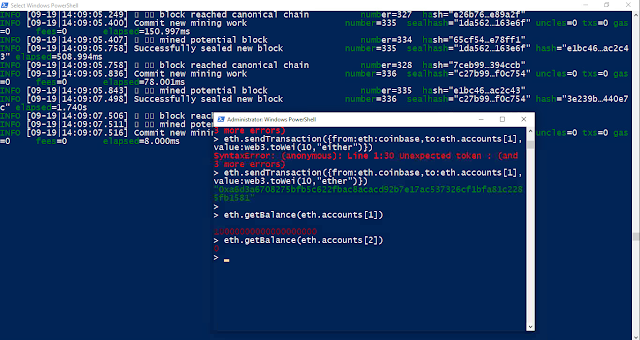

I have run the mining first .Because without mining I wont be able to do the Transaction.

I have did the First transaction and as I highlighted in the Image when the transaction is completed the message will be there in mining that Submitted the Transaction with the Hash ID

The Trans action is Coin base before do the Trans action i check the balance
the command is
eth.getBalance(eth.coinbase)
Then I check the account 1 balance using the command
eth.getBalance(eth.account[1]) it was
0
other command are for general check the
net.version
command is for the network version
Initially when I create my Genesis Block I have select the Net Version Week7 Blog Post
To complete the Transaction I have Unlock my Account
personal.unlockAccount(eth.account[1],"pass1234",300)
In this I have to mention account number [1] My Password for account [pass1234] how long will it be unlock [300] seconds if i didn't assign a time default unlock time is 10 minute.

Then i did the first transaction for Account 1 from coin base the Command was
eth.sendTransaction({from:eth.coinbase,toeth.account[1],value:web3.towei(10,"ether")})
If you compare the Highlighted area with the first image in Mining the hash tag is same

eth.sendTransaction({from:eth.coinbase,toeth.account[2],value:web3.towei(10,"ether")})
I did the second transaction for my Account 2 it was successful to according to the above two of the account have 100000000000000 ETHER.
From this result i can confirm that the I can do trans action successfully between the account (locally)

Comments
Post a Comment